Two-column feed
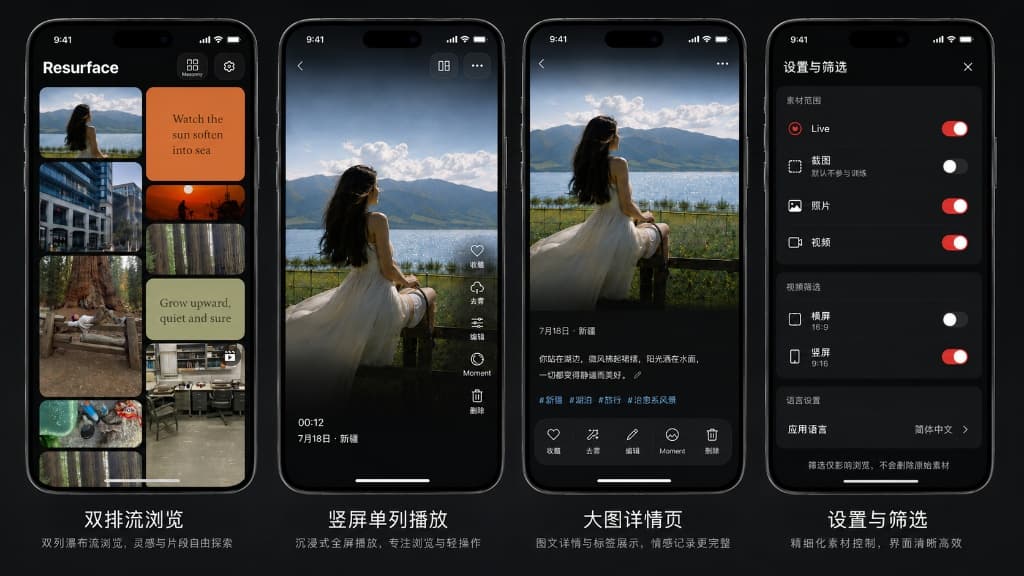
Scan your local library in a compact, social-feed style layout for quick first impressions.
Local vibe training
vibesense reads your local photo library and places photos, Live Photos, and videos into familiar two-column and vertical browsing flows. It does not score your media. It helps you practice your own judgment.
Not a cloud album
Library managers can make creative material feel like a database. vibesense keeps the experience closer to real social feeds, so you can pause, favorite, edit, delete, and compare nearby shots quickly.
Scan your local library in a compact, social-feed style layout for quick first impressions.
Swipe through one asset at a time with five core actions: favorite, dehaze, edit, Moment, and delete.
Use capture time to review nearby shots and find a stronger frame from the same scene.
Save title ideas and notes on device without changing the original photo or video metadata.
Filters stay local
Choose whether Live Photos, screenshots, photos, videos, landscape videos, or portrait videos enter the browsing flow. Nothing is moved, deleted, or uploaded by filtering.
Privacy first
vibesense uses iOS photo-library permission to read local media. Favorites, titles, notes, and filter preferences stay on device; edits are saved as new copies.
vibesense is currently in TestFlight beta. Email us if you would like an invite.
Request beta access